
Quick Answer: You can check your SEWA bill online through the official SEWA website, e-services portal, or SEWA mobile app. Usually, you need your SEWA service account number and sometimes your registered phone number to view or pay the bill. Always check the total amount and payment status before making payment.
If you live in Sharjah, your SEWA bill is one of the regular bills you need to keep track of. It is linked with your electricity, water, and gas services. So yes, it is not something to ignore until the last day.
Many people search for SEWA bill check when they want to see the latest bill amount before paying. Some users just want to confirm if the payment is pending. Others may want to check old usage, billing history, or make sure the amount is not too high this month.
The process is not too hard. If you have your SEWA account details ready, you can check the bill online without visiting a service center. Still, you need to enter the details carefully, because one wrong number can stop the bill from showing.
What Is SEWA Bill Check?
SEWA bill check means viewing your Sharjah Electricity, Water and Gas Authority bill online before you pay it. SEWA is the main authority that provides electricity, water, and gas services in Sharjah.
A simple way to understand it is this: checking the bill and paying the bill are not exactly the same. First, you check how much you need to pay. Then you choose how you want to pay it.
Your SEWA bill may show the current amount, old balance if any, billing details, and payment status. If you use the SEWA app or online portal, you may also get access to billing and payment history, depending on your account access.
What You Need Before Checking Your SEWA Bill
Before checking your SEWA bill online, keep your details ready. The most important one is the SEWA service account number. For the one-time payment page, SEWA asks users to enter the service account number and primary contact number before moving to the next step.
| Detail | What It Means | Why It Helps |
|---|---|---|
| Service Account Number | Your SEWA account number | Helps find your bill or payment details |
| Primary Contact Number | Mobile or phone number linked with the account | May be needed for payment verification |
| UAE Pass | Digital login option | Useful for app or e-services login |
| Emirates ID | Identity document for residents | May be needed for registration or move-in services |
| Bill History | Previous bill and payment record | Helps compare current and older bills |
If you are a new tenant in Sharjah, make sure your SEWA account is active first. For move-in services, SEWA shows steps like selecting service address type, Emirates ID verification, customer and premise details, and review confirmation.
How to Check SEWA Bill Online
The easiest way to check your SEWA bill is to use the official SEWA website or e-services portal. You should avoid random bill-checking websites if they ask for personal details. Use official SEWA channels whenever possible.
- Open the official SEWA website
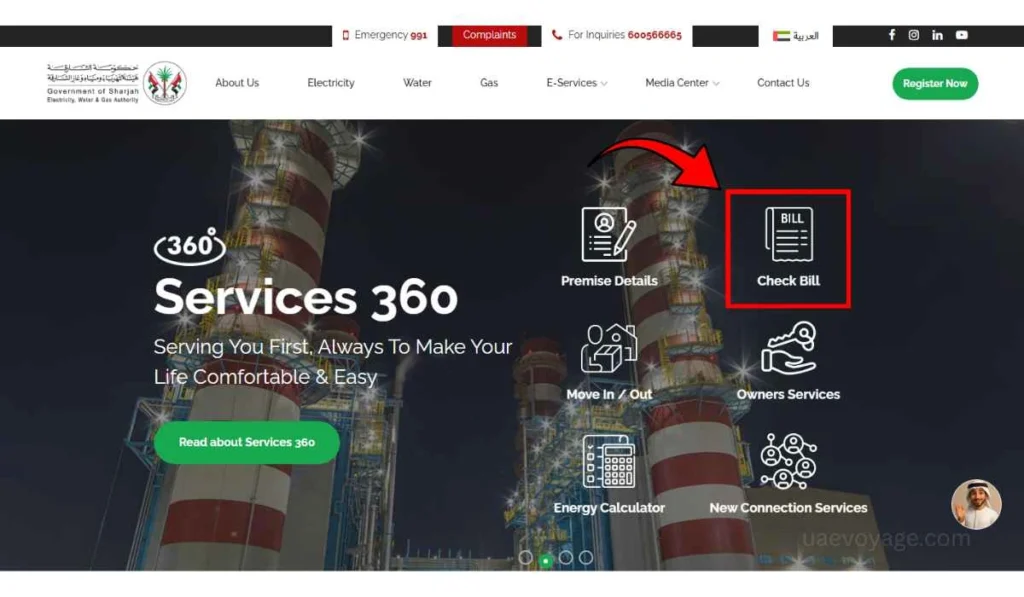
Go to the SEWA website and look for bill checking, e-services, or payment services. The official SEWA homepage also shows a “Check Bill” option, so users can start from there. - Enter your SEWA account number
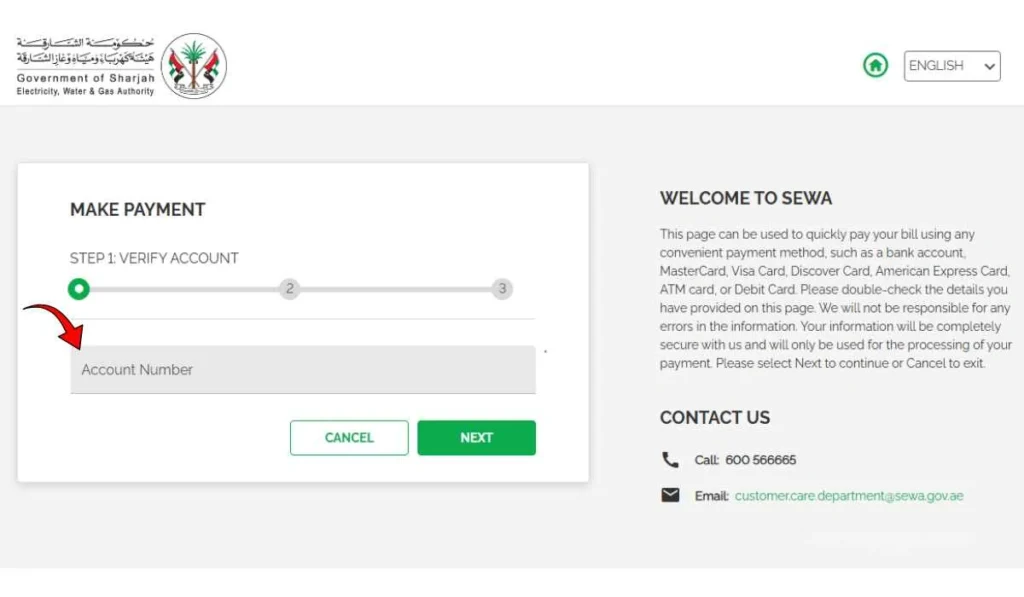
Type your service account number carefully. This number connects the bill with your home, shop, office, or other property. Do not use an old number if you recently changed your place. - Add your contact number if required
Some SEWA payment or enquiry pages may ask for the primary contact number along with the account number. This helps verify the account before moving ahead. - Submit the request
After entering the details, continue to the next step. If the details are correct, you should be able to see the bill or move toward payment review. - Review the amount and payment status Check the total amount carefully. Also look at whether the bill is already paid, still pending, or waiting for update.
- Save or download the bill if available
If the system gives you a download or receipt option, save it. This helps if you need proof later or want to compare bills month by month.
This main method is good for quick checking. For people who manage more than one property, the app or registered account may be easier in the long run.
Other Ways to Check or Manage Your SEWA Bill
SEWA bill checking is not limited to only one page. You can also use the mobile app, e-services login, payment portal, or customer support if online checking does not work.
SEWA Mobile App
The SEWA mobile app is useful if you want to manage your account from your phone. The app listing says users can manage accounts, log in with UAE Pass and Face ID, monitor utility consumption, make secure bill payments, set up auto payment, and check billing and payment history.
This is helpful for regular users. You do not need to search the website again and again. Once your account is set up, bill checking becomes easier.
SEWA E-Services Portal
The SEWA e-services portal lets users sign in with UAE Pass. The portal also mentions that users can pay and analyze bills online and view consumption.
This option is better if you want more than just a quick bill check. For example, you may want to see your consumption pattern, account details, or online services linked with your SEWA account.
SEWA Payment Portal
The payment portal is mainly for paying bills, but it can also help you verify the account and bill amount before payment. On the one-time payment page, the process starts with account verification, then payment details, then review and confirm.
So if your goal is to check and pay at the same time, this method can be useful.
Customer Service or Service Centers
If the bill is not showing, or your account details are not working, contact SEWA support. SEWA lists call center numbers including 991 for 24/7 support and 600566665 for inquiries.
This is better than guessing again and again. Especially if your account is new, closed, transferred, or linked with old details.
Common Problems When Checking SEWA Bill
Sometimes SEWA bill check does not work properly. It can happen for small reasons, so do not panic first.
- Wrong or incomplete account number: This is a common issue. Check every digit before submitting. If the account number is old or missing digits, the bill may not appear.
- Contact number does not match: If the page asks for your primary contact number, enter the number linked with your SEWA account. A different number may not verify the account.
- Latest bill is not generated yet: Sometimes the new monthly bill may not be ready. In that case, check again later instead of trying many random pages.
- Payment is still not updated: If you already paid, the account may take some time to show the updated status. Keep your receipt until the balance is updated.
- UAE Pass or app login issue: If you are using the SEWA app or e-services portal, login problems can happen. Try checking your UAE Pass login or use another official method.
- New account is not fully active: If you recently moved in, your SEWA account setup may still be in process. Wait until your account details are confirmed.
- Website or browser loading issue: Sometimes the page may not load well. Try another browser, clear cache, or use the mobile app instead.
Simple Tips Before Paying Your SEWA Bill
Before paying your SEWA bill, take one minute to check the details. It sounds small, but it can save confusion later.
- Check the total amount, not only the current month’s charge.
- Look at payment status to confirm if the bill is already paid or still pending.
- Compare high bills with old bills if the amount looks unusual.
- Review your consumption if the app or account shows usage details.
- Save your receipt after payment.
- Use official SEWA channels only for checking and payment.
- Keep your account number safe because you may need it again every month.
If your bill suddenly looks too high, do not just pay in a hurry. Check if an old balance is added, or if your electricity, water, or gas use changed that month. Sometimes AC use, leaks, or longer home usage can affect the bill.
FAQs About SEWA Bill Check
How can I check my SEWA bill online?
You can check your SEWA bill through the official SEWA website, e-services portal, or mobile app. You usually need your service account number, and for some payment pages, your primary contact number may also be required.
Can I check SEWA bill without login?
You may be able to use SEWA’s bill check or one-time payment option without full account login, but some features like bill history, account management, or consumption analysis may need login through the portal or app.
What number do I need to check SEWA bill?
The main number you need is your SEWA service account number. For some services, SEWA may also ask for the primary contact number linked with the account.
Can I download my SEWA bill?
If the official portal or app gives a bill download option, you can save it for your records. The SEWA app also mentions billing and payment history features, which can help users manage old records.
Why is my SEWA bill not showing?
Your SEWA bill may not show because the account number is wrong, the bill is not generated yet, your contact number does not match, or the account is not active. Try checking the details again first.
Can I check previous SEWA bills online?
Yes, the SEWA app and e-services portal may help users check billing and payment history after login. This is useful if you want to compare current and old bills.
Final Thoughts
SEWA bill check is simple when you have the correct service account number. You can use the official SEWA website, e-services portal, mobile app, or payment page to view and manage your Sharjah utility bill. Just make sure you check the total amount, payment status, and account details before paying.
Have you ever faced a SEWA bill issue like bill not showing, wrong account number, or payment not updating? Share your issue in the comments, it may help another Sharjah resident too.