
Quick Answer: You can check your Salik balance from the official Salik website, Smart Salik app, RTA Dubai app or by calling Salik support. Keep your Salik account number, PIN, registered mobile number, or plate details ready. If the balance is low, recharge it before driving through Dubai toll gates.
If you drive in Dubai, Salik balance is something you should not ignore for too long. Salik is the road toll system in Dubai. When your car passes a Salik gate, the toll amount is taken from your Salik account.
Many drivers only check Salik after receiving a low-balance message. It happens, no big issue. But it’s still better to check before driving, especially if you use toll roads almost every day.
A quick Salik balance check helps you know if your account has enough money. It also helps you avoid unpaid trips, low balance alerts, and last-minute recharge stress. And honestly, the process is not difficult once you know where to check.
What Is Salik Balance Check?
Salik balance check means checking how much money is left in your Salik account. This balance is linked with your vehicle and Salik tag. Every time your car crosses a Salik toll gate, the toll fee is deducted from this amount.
So, balance check is just checking the available amount. Recharging is adding more money to the account. Both are connected, but they are not the same thing.
You may also see trip history, transaction history, unpaid trips, account activity, and low balance alerts in your Salik account. This is useful when your balance drops quickly and you want to know where the money went.
What You Need Before Checking Salik Balance
Before you start, keep your details ready. Some methods need only login, while others may ask for account details or vehicle information.
| Detail | Why You Need It |
|---|---|
| Salik account number | To find or log in to your account |
| Salik PIN | To verify your Salik account |
| Registered mobile number | Useful for account lookup and alerts |
| Vehicle plate number | Helps identify the car linked with Salik |
| Smart Salik app | Easy way to check balance and recharge |
If you forgot your account number or PIN, don’t keep guessing again and again. Use the official Salik support option and recover the details properly.
How to Check Salik Balance Online
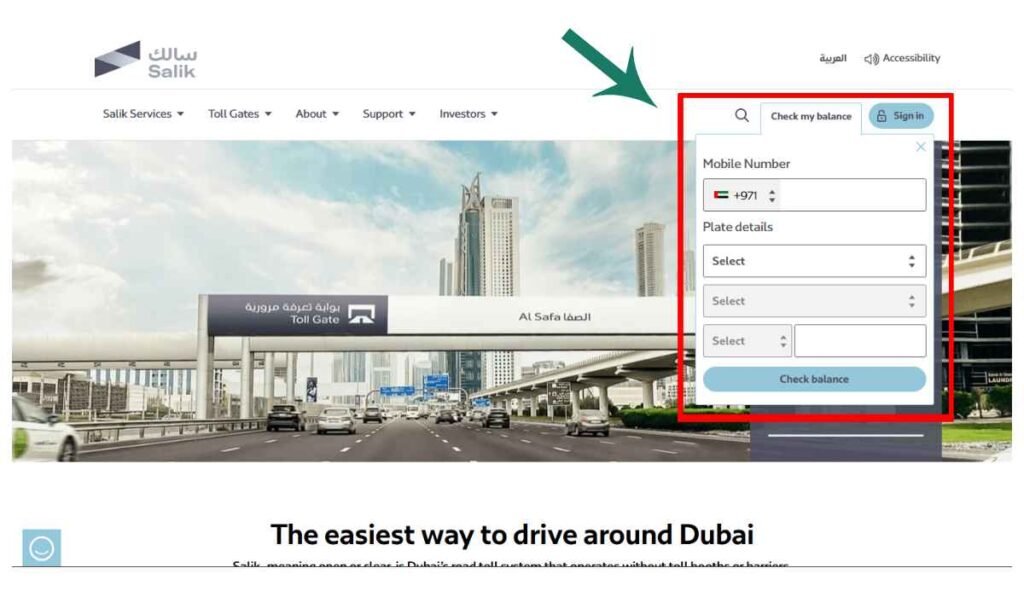
The easiest way is to use the official Salik website or Smart Salik app. This is better because you can check balance, see trips, view transactions, and recharge from one place.
- Open the official Salik website or Smart Salik app
Start from the official Salik channel only. Do not use random websites that ask for your Salik PIN or payment details. - Log in or enter the required details
You may need your Salik account number, PIN, registered mobile number, or vehicle details. Enter them carefully. One wrong digit can stop the account from showing. - Go to the balance or account section
After login, look for account summary, dashboard, or balance section. This is where your current Salik balance usually appears. - Check your available balance
See how much money is left. If the balance is low, it is better to recharge before your next drive. - Review trips if the balance looks low
If the balance dropped more than expected, check recent trips or transactions. Maybe you crossed more gates than usual. - Recharge if needed
If the balance is not enough, recharge from the website, app, recharge card, or other official method.
How to Check Salik Balance by Plate Number
Some drivers search for Salik balance check by plate number because they do not have the account number nearby. This can help in some cases, but plate number alone may not always be enough.
A general process can be like this:
- Open the official Salik balance check service.
- Choose the plate-based option if it is available.
- Enter your registered mobile number.
- Select emirate, vehicle type, plate code, and plate number.
- Submit the details and check the balance if the account matches.
Just keep one thing in mind. Salik balance is connected with an account. So the system may ask for extra details to confirm the right user. This is normal.
Other Ways to Check Salik Balance
There is not only one way to check Salik balance. You can use the method that feels easy for you.
Smart Salik App
The Smart Salik app is probably the easiest option for regular drivers. You can check your balance, recent trips, transactions, recharge details, and low balance alerts.
If you drive through Salik gates often, keep the app on your phone. It saves time. You can check balance before leaving home or before taking a toll road.
Salik Balance Check by Phone Call
If you do not want to use the website or app, you can call Salik support.
Here is the simple way:
- Call 800 SALIK or 800 72545.
- Select your language.
- Choose the account login option.
- Enter your Salik account number and PIN.
- Listen to your current balance.
This method is useful when your internet is not working or the app is not opening.
Salik Balance Check by SMS
SMS is mostly used for some Salik services and recharge card actions. For checking balance, the website, app, or call center is usually clearer.
Be careful with SMS. Do not send your Salik PIN to random numbers. Only follow official Salik instructions. If you are not sure about the SMS format, use the app or call center instead.
How to Recharge Salik After Checking Balance
If your Salik balance is low, recharge it before driving through toll gates. Do not wait for the last moment, especially if you drive daily.
You can recharge your Salik account in a few ways:
- Use the Salik website or Smart Salik app
This is the easiest method for most users. You can check balance and recharge from the same place. - Set automatic recharge
If you drive a lot, automatic recharge can help. Your account gets topped up when the balance becomes low. - Use a Salik recharge card
Some people still prefer recharge cards. Just enter the recharge number carefully and keep the confirmation. - Save the receipt or SMS confirmation
Don’t delete it right away. If the balance does not update, the receipt can help. - Check balance again after recharge
This confirms that the money was added to the correct Salik account.
Common Problems When Checking Salik Balance
Sometimes Salik balance does not show properly. Most of the time, the issue is simple.
- Wrong account number or PIN: Check the details again. Even one wrong digit can stop the balance from showing.
- Registered mobile number does not match: If your mobile number is not linked with the Salik account, the lookup may fail.
- The plate number or plate code is incorrect: Plate details must match the vehicle linked to your Salik account.
- Balance not updated after recharge: Wait for confirmation first. If it still does not update, contact Salik support and keep your receipt ready.
- The app or website is not loading. Try another browser, update the app, or check again later.
- The low balance alert is still showing. Sometimes alerts take a little time to clear. Check the actual balance again from the app or website.
- Vehicle is not linked to the account: If you recently bought, sold, or transferred a car, make sure the plate is linked with the correct Salik account.
Safety Tips for Salik Balance Check and Recharge
Salik account details should be handled carefully. Many people click payment links quickly, especially when they get a message. That can be risky.
- Use only the official Salik website or Smart Salik app.
- Do not share your Salik PIN with anyone.
- Avoid payment links from unknown SMS or WhatsApp messages.
- Check the vehicle and account before recharge.
- Save your recharge receipt or SMS confirmation.
- Set low balance alerts if available.
- Contact Salik support if something looks wrong.
The main thing is simple. Check balance from official channels. Recharge only after confirming the account. Small care can save a big headache later.
FAQs About Salik Balance Check
How can I check my Salik balance online?
You can check your Salik balance through the official Salik website, Smart Salik app or via RTA Dubai app.
Can I check Salik balance by plate number?
You may be able to use plate details in some lookup options. But you may still need account verification, registered mobile number or other details.
What details do I need to check Salik balance?
You may need your Salik account number, PIN, registered mobile number and vehicle plate details. It depends on the method you use.
How do I check Salik balance without internet?
You can call 800 SALIK or 800 72545. Follow the phone menu, enter your account number and PIN and listen about your balance.
How can I recharge my Salik account?
You can recharge through the Salik website, Smart Salik app, automatic recharge or recharge card. After recharge, save the confirmation and check the balance again.
Why is my Salik balance not showing?
Your balance may not show because the account number is wrong, PIN is incorrect, the mobile number does not match or the app has a loading issue. Check the details and try again.
What is the Salik customer care number?
The Salik customer care number is 800 SALIK, also written as 800 72545.
Final Thoughts
Salik balance check is simple when you have the right account details. You can use the official Salik website, Smart Salik app, RTA Dubai app, or phone call method. If you drive through Dubai toll gates often, check your balance before driving and recharge early when the amount is low.
Have you ever faced a Salik issue like balance not updating, wrong plate details, or recharge not showing? Share your issue in the comments, it may help another Dubai driver too.