
Quick Answer: You can check your EtihadWE bill online through the official EtihadWE website or mobile app. Open the bill payment or View and Pay service, enter your account number, then review the monthly invoice amount before paying. EtihadWE’s payment service lets customers view the amount due and continue with bill payment if needed.
If you live in the Northern Emirates, your EtihadWE bill is one of the main monthly bills you may need to check. It is linked with your electricity and water services. So before paying, it is better to view the amount properly.
Many people still search for FEWA bill check because FEWA was the old name. Now the service is known as Etihad Water and Electricity, or EtihadWE. So if you see EtihadWE instead of FEWA, do not get confused. It is the current name used for these electricity and water services.
The process is not very hard. You mostly need your account number, and then you can check the amount due online. After that, you can decide if you want to pay right away or just save the bill details for later.
What Is EtihadWE Bill Check?
EtihadWE bill check means viewing your electricity and water bill before making payment. It helps you see the monthly invoice amount, amount due, and payment details if available.
A simple way to understand it is this. Checking the bill is the first step. Paying the bill is the second step. When you check first, you can confirm the amount and account number before using your card or any payment method.
This is useful for tenants, homeowners, and business users. Sometimes the bill may look higher than usual. Sometimes an old balance may be included. So yes, checking the bill first is a small step, but it can avoid confusion.
Is FEWA Now EtihadWE?
Yes, many users still know it by the old FEWA name. FEWA means Federal Electricity and Water Authority. Etihad Water and Electricity was established in 2020 and replaced FEWA for these services, according to the UAE Government portal.
That is why you may see people searching “FEWA bill check” and “EtihadWE bill check” for the same type of service. In this article, we are using EtihadWE because it is the current service name.
What You Need Before Checking Your EtihadWE Bill
Before you start, keep your details ready. The account number is usually the most important detail because the bill is connected with that account.
| Detail | Why You May Need It |
|---|---|
| Account Number | To find your EtihadWE bill and amount due |
| Mobile Number | May be useful for account or app services |
| Email Address | Helpful for app registration or bill updates |
| UAE Pass | May be used for some digital service access |
| EtihadWE App | Useful for account information and services |
If you are a new tenant or recently changed your place, make sure you are using the latest account details. Old FEWA or EtihadWE numbers from a previous home may not show your current bill.
How to Check EtihadWE Bill Online
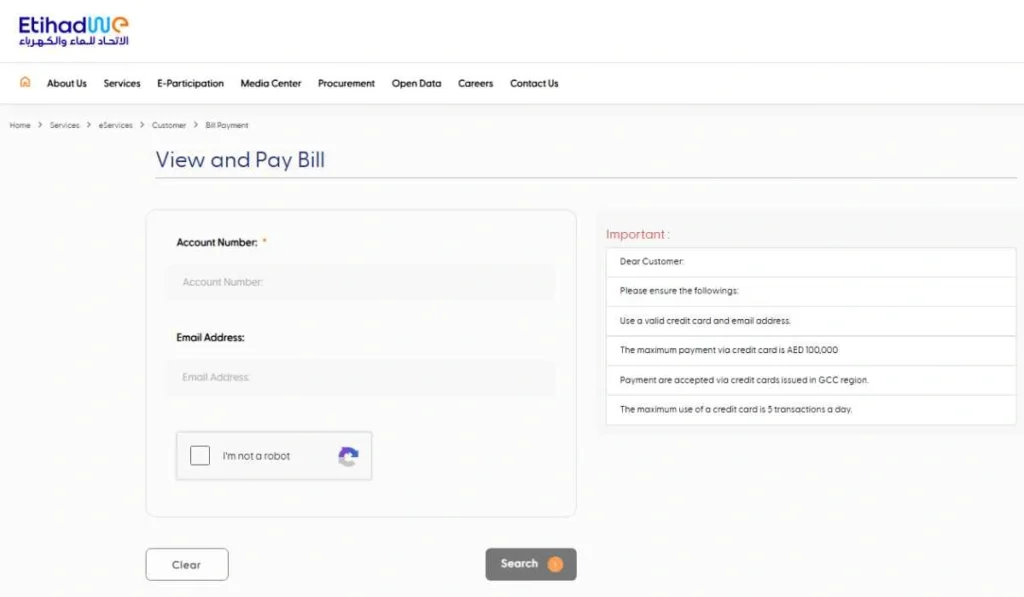
The easiest way to check your EtihadWE bill is through the official EtihadWE website. The bill payment service says customers can view the amount due as per the monthly invoice and then proceed with payment.
- Open the official EtihadWE website
Start from the official EtihadWE website. Avoid random pages that ask for account or card details, because utility bill information should be handled carefully. - Go to the Services section
Find the services or eServices area. The bill service is usually listed under payment or bill-related services. - Select View and Pay or Bill Payment
This is the service used to view the amount due and continue with payment if you want. You can use it only to check the amount first. - Enter your account number
Type your EtihadWE account number carefully. Check every digit before moving ahead because one wrong number can stop the bill from showing. - Review the amount due
Look at the monthly invoice amount and any amount due. If the amount looks unusual, do not rush. Check your usage or old balance if shown. - Choose payment option only if you want to pay
If you only wanted to check the bill, you can stop after reviewing the amount. If you want to pay, continue with the payment option shown on the official page. - Save receipt or bill details
If you complete payment, save the receipt. Even if you only check the bill, it can help to note the amount and account number for your records.
Other Ways to Check or Manage Your EtihadWE Bill
You do not have to use only the website. EtihadWE also provides app-based services, and regular users may find the app easier.
EtihadWE Smart App
The EtihadWE mobile app gives customers real-time information about their EtihadWE accounts, according to the app listing. It also supports EtihadWE eServices.
This can be useful if you check your bill often. Instead of opening the website every month, you can manage account details and services from your phone.
Account Linking Service
If you use EtihadWE digital services regularly, linking your billing account can make things easier. It helps connect your account with online services, so you can manage bills and other account-related options more smoothly.
This is more useful for long-term residents, business users, or people who manage more than one account. For a one-time quick bill check, the View and Pay service may be enough.
Customer Happiness Centre or Support
If the website or app does not work, you can use EtihadWE support options or visit a Customer Happiness Centre where available. The official EtihadWE website also shares updates about smart and digital channels for services, so online support is usually a good first option.
Use support especially when your bill is not showing, your account number looks wrong, or your payment is not updated.
Common Problems When Checking EtihadWE Bill
Sometimes EtihadWE bill check may not work on the first try. Usually, the reason is simple.
- Wrong or incomplete account number: This is the most common issue. Check the number again and make sure you are not using an old account from another property.
- Latest bill is not generated yet: If your monthly invoice is not ready, the latest amount may not appear. In that case, check again later.
- Payment status is not updated: If you recently paid, the system may take some time to show the updated status. Keep your receipt until the payment reflects.
- Billing account is not linked: If you are using app or online account services, you may need to link the correct billing account before seeing full details.
- App or website loading issue: Sometimes it is just a browser or app problem. Try refreshing the page, using another browser, or opening the mobile app.
- Using old FEWA pages or unofficial sites: Since the name changed from FEWA to EtihadWE, some old pages or third-party guides may confuse users. Use the official EtihadWE website or app.
Simple Tips Before Paying Your EtihadWE Bill
Before paying, take a minute to check the bill details. It is a small thing, but it helps avoid wrong payments.
- Check the amount due before continuing to payment.
- Confirm the account number is correct.
- Look at the monthly invoice amount and see if it looks normal.
- Choose the payment option carefully if you decide to pay online.
- Read the terms before proceeding when the page asks for confirmation.
- Save your payment receipt after payment.
- Use only the official EtihadWE website or app for bill check and payment.
If your bill is higher than normal, compare it with your usual electricity and water usage. AC use, water leaks, guests, or more time at home can increase the bill. But if the amount still looks strange, contact EtihadWE support before paying in a hurry.
FAQs About EtihadWE Bill Check
How can I check my EtihadWE bill online?
You can check your EtihadWE bill through the official EtihadWE website. Open the bill payment or View and Pay service, enter your account number, and review the amount due before payment.
Is FEWA bill check the same as EtihadWE bill check?
Yes, in common search terms, many people use FEWA bill check for EtihadWE services. FEWA was replaced by Etihad Water and Electricity, so EtihadWE is the current name.
What number do I need to check the EtihadWE bill?
You mainly need your EtihadWE account number. This number helps the system find your monthly invoice and amount due.
Can I check EtihadWE bill through the mobile app?
Yes, you can use the EtihadWE mobile app. The app gives customers real-time information about their EtihadWE accounts and supports EtihadWE eServices.
Why is my EtihadWE bill not showing?
Your bill may not show because the account number is wrong, the latest bill has not been generated, the account is not linked, or the website/app is having a loading issue. Check your details first and try again through official channels.
Can I pay EtihadWE bill online?
Yes, EtihadWE’s payment service allows customers to view the monthly invoice amount due and pay the bill online.
Final Thoughts
EtihadWE bill check is simple when you have the correct account number. Open the official EtihadWE website or app, check the amount due, and make sure the account details are correct before paying. Also remember that FEWA is the old name, while EtihadWE is the current service name.
Have you faced any issue while checking your EtihadWE bill, like bill not showing, wrong account number, or payment not updating? Share your issue in the comments, it may help another user too.