
So the ILOE scheme is basically the UAE’s unemployment insurance, covering private sector and federal government employees. You have to join if you’re eligible. Skip the subscription or fall behind on premium payments, and you’ll get fined. Running an ILOE fine check tells you if there’s anything outstanding, and you can pay it off before it messes up a work permit renewal or visa transaction.
This guide covers the ILOE fine amounts, the official ways to check them online, how to pay, and how to keep your subscription active so new fines don’t appear.
What Is the ILOE Fine?
MOHRE (Ministry of Human Resources and Emiratisation) runs the ILOE scheme. It’s the body behind unemployment insurance here. Lose your job for reasons outside your control and it pays out a monthly benefit for a set period. Got fired for misconduct or resigned? That doesn’t qualify. Because it’s mandatory, MOHRE slaps fines on eligible employees who haven’t signed up or kept up with payments.
There are two main ILOE fines:
| Fine | Reason | Amount |
|---|---|---|
| Non-subscription fine | Not joining the ILOE scheme within the required time | AED 400 |
| Unpaid premium fine | Not paying premiums for more than three months after the due date | AED 200 |
An unpaid premium fine can also lead to your ILOE policy being cancelled. Some people end up with both fines, for example if they joined late and then missed payments.
Who Must Subscribe to ILOE
Most employees in the UAE private sector and federal government must subscribe. The premium depends on your basic salary.
The two subscription categories are below:
| Category | Basic salary | Monthly premium |
|---|---|---|
| Category 1 | AED 16,000 or less | AED 5 plus VAT |
| Category 2 | More than AED 16,000 | AED 10 plus VAT |
Some people are exempt. Business owners who work in their own company, domestic workers, anyone on a fixed-term contract, anyone under 18. Also retirees who are already collecting a pension and have picked up a new job. Not sure which side you fall on? Go check your status on the official portal first. Don’t just assume you’re off the hook.
How to Check Your ILOE Fine on the MOHRE Website
The MOHRE e-services portal is the main place to do this. You use your Emirates ID and no account setup is required for a basic check.
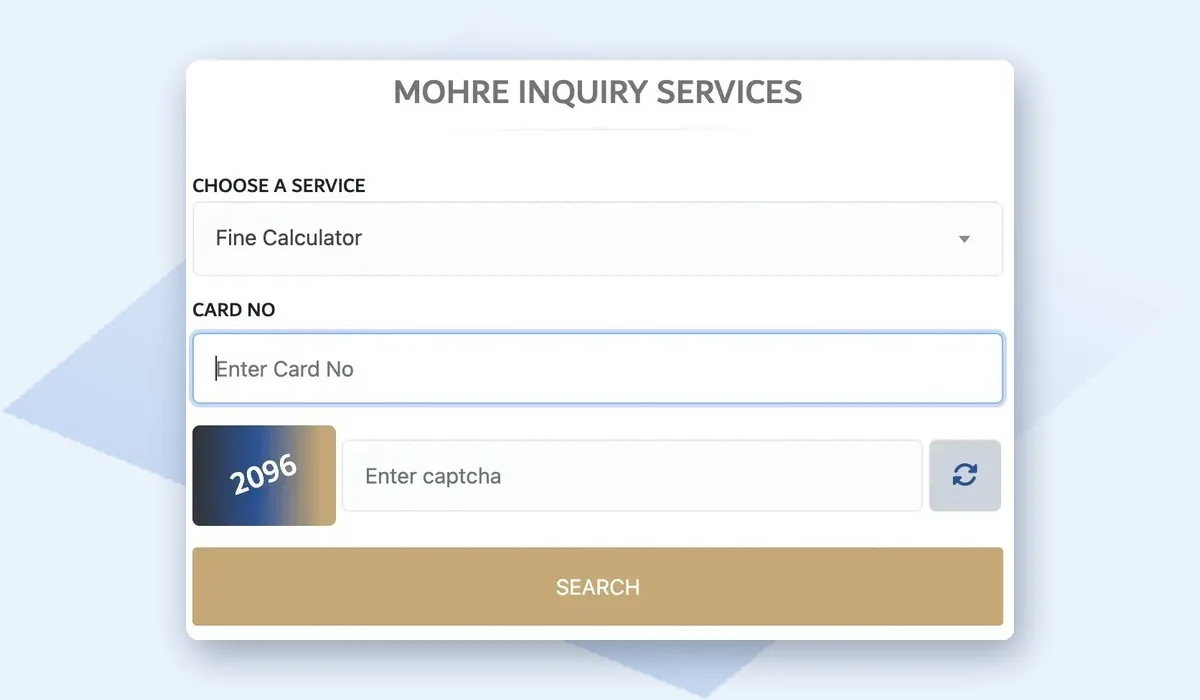
The steps to check are below:
- Go to the official MOHRE e-services website at eservices.mohre.gov.ae.
- Find the ILOE fines or payment service.
- Choose Emirates ID as your identifier.
- Enter your Emirates ID number and the mobile number registered with it.
- Enter the OTP sent to your phone.
- Review the result. Any fine will show the amount and reason.
If the page shows no fine, you’re up to date. If a fine appears, you can pay it online in the same session.
How to Check on the ILOE Website or App
The scheme also has its own portal at iloe.ae and an ILOE app. These show your subscription status, premium history and any fines in one place.
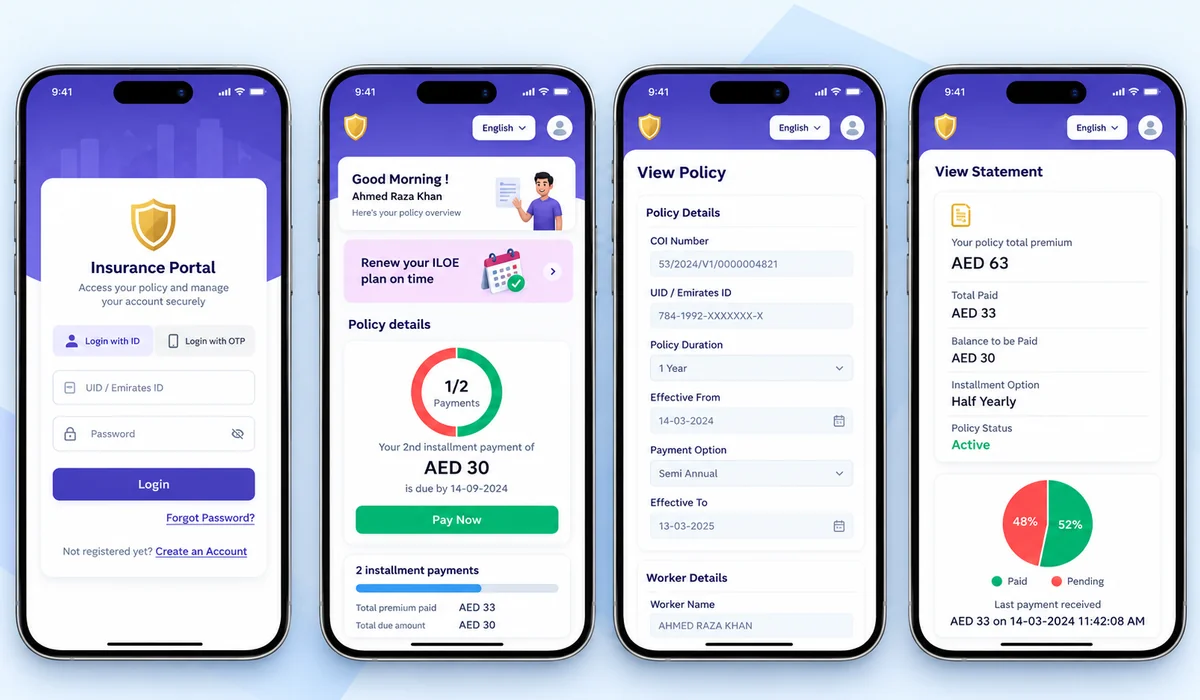
The steps to check are straightforward:
- Go to iloe.ae or open the ILOE app.
- Sign in using your Emirates ID and the mobile number tied to it.
- You’ll get a one-time code by SMS. Enter that to get in.
- Open your account or policy section.
- There’s a fines or penalties section in there. That’s where any outstanding amount shows up.
You can also see if your policy is active, expired, or cancelled from the same dashboard. Downloading your ILOE certificate from here is useful if your employer asks for proof of subscription.
How to Check Through the MOHRE App
The MOHRE app is another option if you already use it for work permit services.
The steps below walk you through it:
- Download the MOHRE app from the App Store or Google Play.
- Sign in with UAE Pass.
- Open the employee or insurance services section.
- Select the ILOE status or fines option.
- View any fine and pay it in the app.
How to Pay an ILOE Fine
ILOE fines can be paid online by debit or credit card through the MOHRE portal, the MOHRE app or the ILOE platform. Payment is processed right away, and you’ll get a confirmation. You can also pay through authorised channels, such as Tasheel or Tawjeeh service centres, if you’d rather pay in person.
Keep the receipt until the fine no longer appears in your record. Paying the fine doesn’t subscribe you to the scheme. If the fine was for not subscribing, you still need to join ILOE after paying, or the problem will continue.
What Happens If You Don’t Pay
Unpaid ILOE fines stay linked to your record with MOHRE. They can create problems when you try to complete certain employment services.
These are the common effects of unpaid fines:
- Delays when renewing or issuing a new work permit
- Problems when changing jobs or employers
- Fines being deducted from salary or end of service benefits in some cases
- Your ILOE policy gets cancelled, which means you lose the right to claim benefits altogether
So check every few months. Literally takes two minutes on iloe.ae. See something outstanding? Pay it that day and be done with it. Beats dealing with a blocked work permit later.
Avoid Fake ILOE Payment Websites
Scammers are very aware that ILOE fines are common. Fake websites turn up regularly, and dodgy SMS messages too (usually designed to grab your card details or Emirates ID info). Stick to official channels only.
Use these sources only:
- eservices.mohre.gov.ae and the official MOHRE app
- iloe.ae and the official ILOE app
- Authorised Tasheel and Tawjeeh centres
The official fine check is free. Any site asking for a “processing fee” on top of the actual fine amount is not legitimate. Never give OTP codes to anyone calling or messaging you out of nowhere, even if they say they’re from MOHRE. Seen a suspicious link? Close it. Type the official URL straight into your browser instead of clicking anything forwarded to you.
How to Keep Your ILOE Subscription Active
Staying subscribed and paid up is the simplest way to dodge fines entirely. A few things that actually work:
- Sign up as soon as you start a new private sector or federal government job. Same week, ideally.
- If your bank or payment channel offers auto-renewal, turn it on. Takes two minutes and you forget about it.
- Paying the full year upfront is easier than monthly. Monthly payments are easy to miss, especially if your card expires or things get hectic around Eid.
- Update your registered mobile number any time you change it. MOHRE reminders go to that number and nowhere else.
- Open iloe.ae every couple of months. Just confirm the policy still shows as active. Done.
Final Thoughts
An ILOE fine check takes a few minutes on the MOHRE e-services portal or iloe.ae using your Emirates ID and an OTP. Miss the subscription entirely and it’s AED 400. Let premiums lapse beyond three months and it’s AED 200 on top of that. Use official channels to pay, then sort out your subscription so you don’t get hit again.
Also, it’s a good idea to run an Emirates ID fine check while you’re at it, just to make sure there aren’t any residency fines sitting on your record too.